Modules
Data Analyst
Data Engineer
Product Data Scientist
AI Engineer
Machine Learning Engineer
Prompt Engineer

For this section, we will go cover Percentiles and go over real examples. You know us, we don't BS!
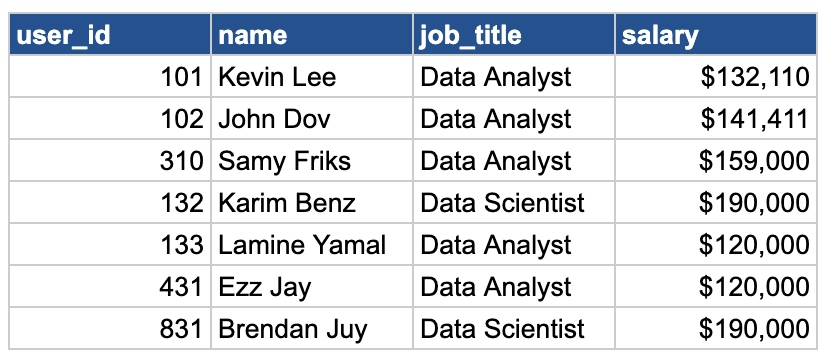
You are working with the salaries table and you want to find the middle value (aka MEDIAN) of all the salary values:
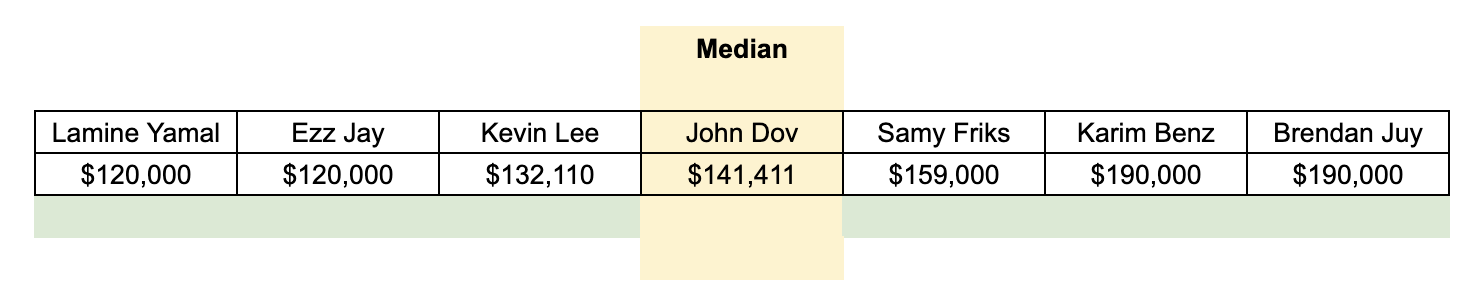
We first want to order our dataset of salary from lowest to highest salary and find the middle value.
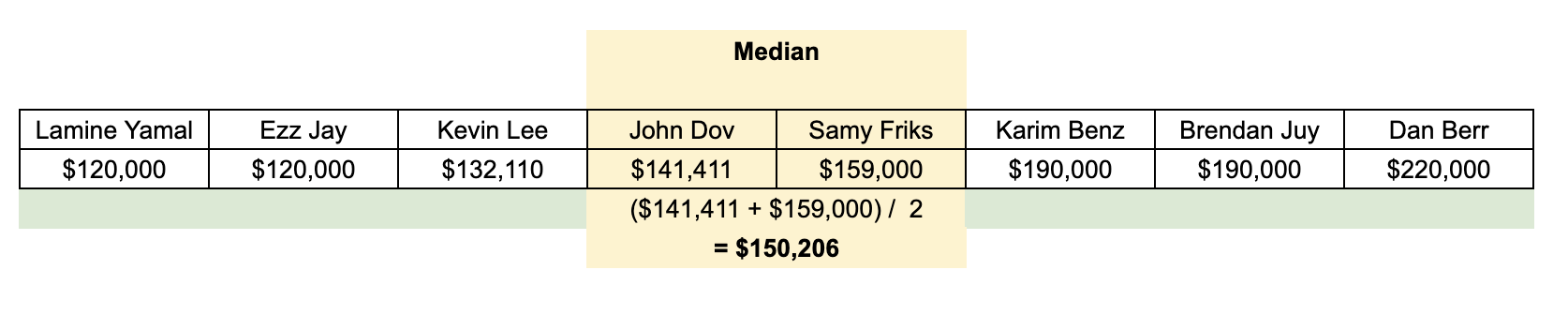
If we add 1 extra value to this dataset, our "middle" is the average of the 2 salaries from John Dov and Samy Friks.
Now, that you know how it works, there is a function that will handle all of that for you in SQL.

This function is called PERCENTILE_CONT. Let's go through how we will use it in SQL:
SELECT
  PERCENTILE_CONT(0.5) WITHIN GROUP (ORDER BY salary) AS median
FROM
  salaries;
Does it remind you of something? Yes it looks similar to the window functions we've learned in the previous sections. It actually is one!
What it does is pretty simple! It looks at the middle point of the data (specified by 0.5) - which actually means 50%! And you need to tell the function which group to look at. In this case, we are looking at salary WITHIN GROUP (ORDER BY salary).
But what if I wanna know the salary for each job title?
You will simply group by job title! Easy peasy!
SELECT
  job_title,
  PERCENTILE_CONT(0.5) WITHIN GROUP (ORDER BY salary) AS median
FROM
  salaries
GROUP BY 1;
Now that you know how median works (50 percentile), the logic is the same to get the top 10%, top 5% and top 1%. You simply need to specify the value in the PERCENTILE_CONT function.
To get Top 1%
SELECT
  PERCENTILE_CONT(0.01) WITHIN GROUP (ORDER BY salary DESC) AS top_1_pct
FROM
  salaries;
See what I did here? I specify 1% which is 0.01 and made the salary ordered by descending order (because we want the highest salary first).
Same logic applies for top 5%:
SELECT
  PERCENTILE_CONT(0.05) WITHIN GROUP (ORDER BY salary DESC) AS top_5_pct
FROM
  salaries;
Enough reading, let's practice!